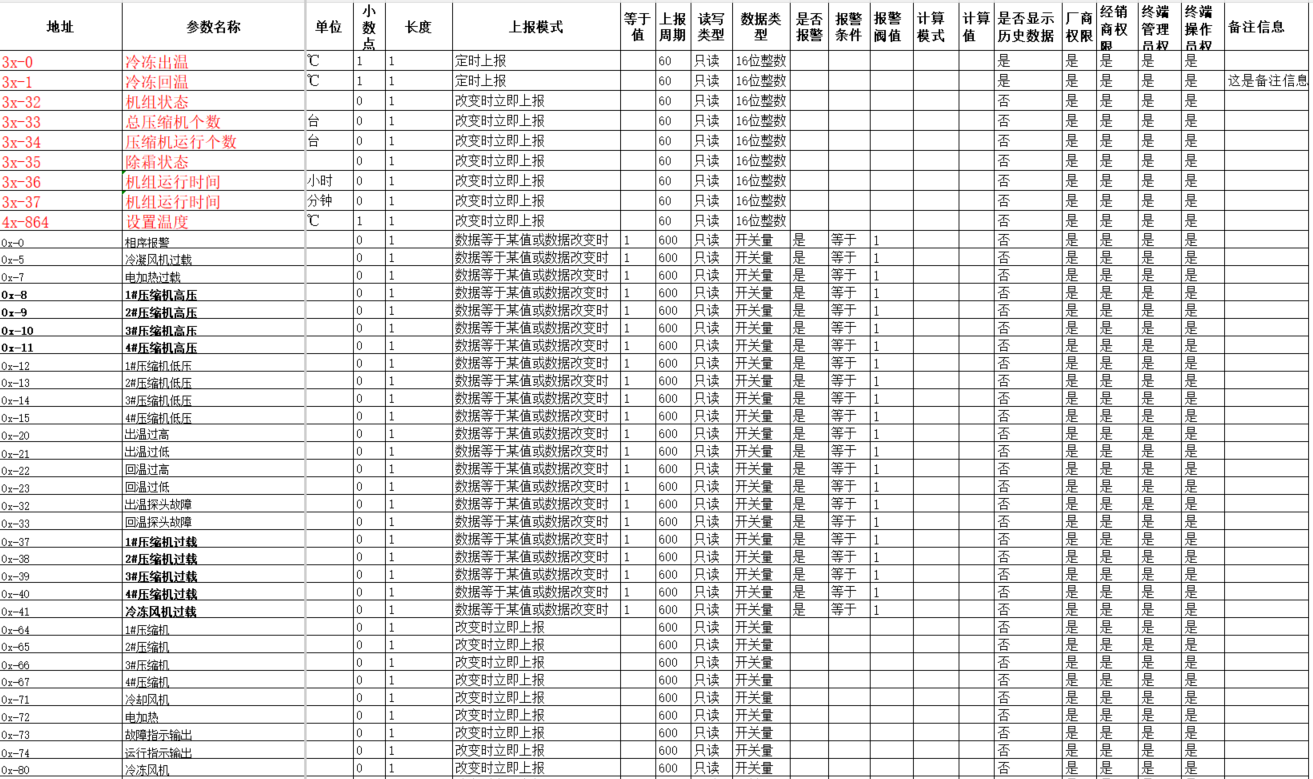
Batch Import Parameter Template

Batch Import Parameter Table Description
| Item | Range | Description |
|---|---|---|
| Address | 4x-000、3x-000、1x-000、0x-000、3x-000.0、4x-000.0 | The suffix "-" is a decimal number, "000" represents a decimal address, range -65535~65535, "000.0" represents a bit address. Example: 4x-101 represents read-write register 101, 4x-101.0 represents the 0th bit of read register 101. When the address type is 3x-000.0, 4x-000.0, the read-write type must be "Read-only", the data type must be "Switch", and the data length must be "1" |
| Parameter Name | Chinese, English, numbers, underscores | |
| Unit | Empty or unit name, default is empty | |
| Decimal Point | 0~4 decimal points, default is 0 | When the address is 1x-000, 0x-000, 3x-000.0, 4x-000.0, the decimal point must be 0 |
| Length | 1, 1~32 | When the data type is ASCII, the length is 1~32, when the data type is other, the length is 1 (must be 1) |
| Reporting Mode | Report when changed, Report when data equals a certain value or when changed, Timed reporting | Report when changed: Report when changed, report at the interval specified by "Reporting Period" when not changed Report when data equals a certain value or when changed: Report immediately when data changes, report at the interval specified by "Reporting Period" when data equals the value in "Equals Value" item, report at 5 times the interval of "Reporting Period" when data does not equal "Equals Value". Timed reporting: Data is reported at the interval specified by "Reporting Period" |
| Equals Value | -65535~65535 | Valid when the reporting mode is "Report when data equals a certain value or when changed", when the data equals "Equals Value" data, report at "Reporting Period" interval |
| Reporting Period | 60~1800 (must be a multiple of 60) | When the reporting mode is "Timed reporting", data is reported at the interval specified by "Reporting Period" When the reporting mode is "Report when data equals a certain value or when changed", "Reporting Period" is the reporting interval when data equals "Equals Value" |
| Read-Write Type | Read-only, Read-write | |
| Data Type | ASCII, Switch, 16-bit integer, 16-bit positive integer | When the address type is 1x, 0x, 3x_Bit, 4x_Bit, the data type must be Switch, when the address type is 4x, 3x, the data type must be 16-bit integer, 16-bit positive integer, When the data type is ASCII, the address type must be 3x |
| Whether to Alarm | Yes, No | When "Whether to Alarm" is selected as "Yes", "Alarm Condition" is selected as "Equals", "Alarm Threshold" is "1", it means alarm is triggered when the reported parameter value is 1 |
| Alarm Condition | Equals, Less than, Greater than, Not equal to, Greater than or equal to, Less than or equal to | |
| Alarm Threshold | -65535~65535 | |
| Calculation Mode | Addition, Subtraction, Division, Multiplication, None | Default is None, example: actual temperature is 23℃, calculation mode is "Addition", calculation value is "100", then the interface displays 23, the actual stored value is 123 Other modes are analogous |
| Calculation Value | -65535~65535 | |
| Whether to Display Historical Data | Yes, No | Select "Yes", then the mobile phone interface can display data curves, historical data can be exported, otherwise not. |
| Manufacturer Permission | Yes, No | Select "Yes", then the corresponding user of the parameter can see it, otherwise not |
| Dealer Permission | Yes, No | |
| End User Permission | Yes, No | |
| Remarks | Chinese and English | Remark information |
Special Instructions
Data Traffic Saving Tips
- Analog quantities such as temperature and humidity use "Timed reporting", it is not recommended to use "Report when changed", otherwise it will consume too much data and the SIM card will be suspended
- Setting parameters such as shutdown temperature setting, startup, reset, etc. use "Report when changed"
- Fault alarm parameters use "Report when data equals a certain value or when changed" mode, and set "Equals Value" and data "Reporting Period" Example: Compressor overload fault Reporting type selected "Report when data equals a certain value or when changed", "Equals Value" is "1", reporting period is "60", then when the compressor overload fault occurs, data 0-->1, data is reported immediately, when the fault is not processed for a long time, data remains 1, then DTU reports data every 60 seconds
Historical Data
- Select "Yes" for analog quantities such as temperature and humidity, select "No" for non-analog quantities such as "Startup temperature" and "Compressor overload"
Must include "Read-only Area" and "Read-write Area", "Address" item must be in the 1st column
Batch Import Parameter Example