
4G Offline Troubleshooting

1. Overview
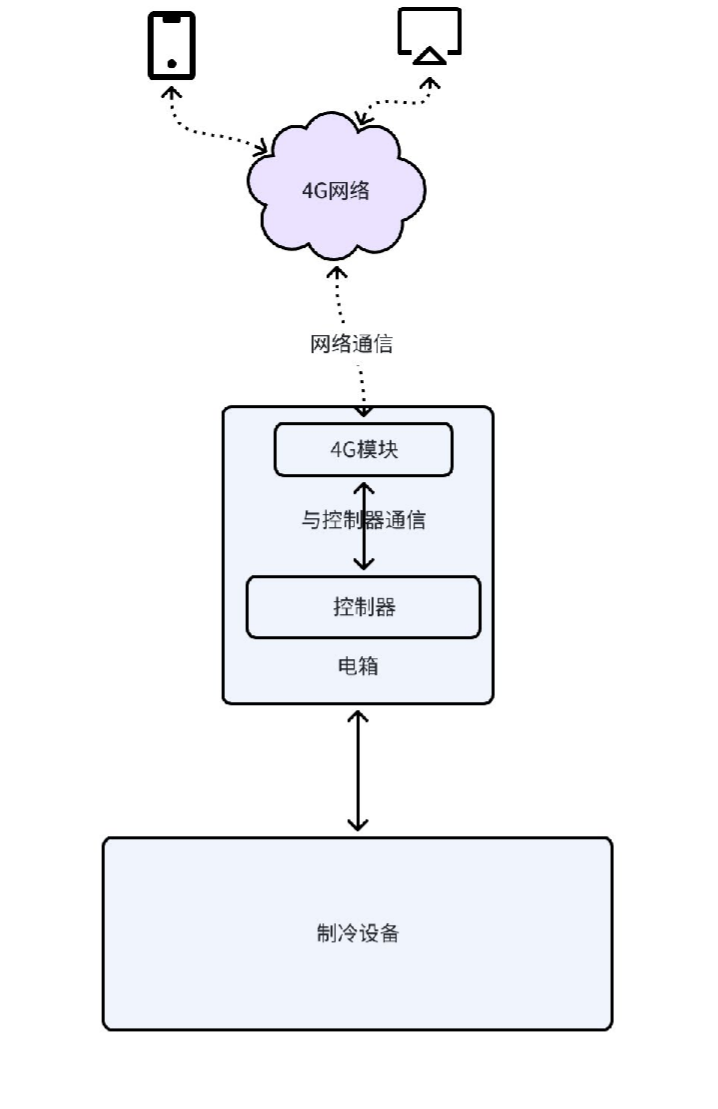
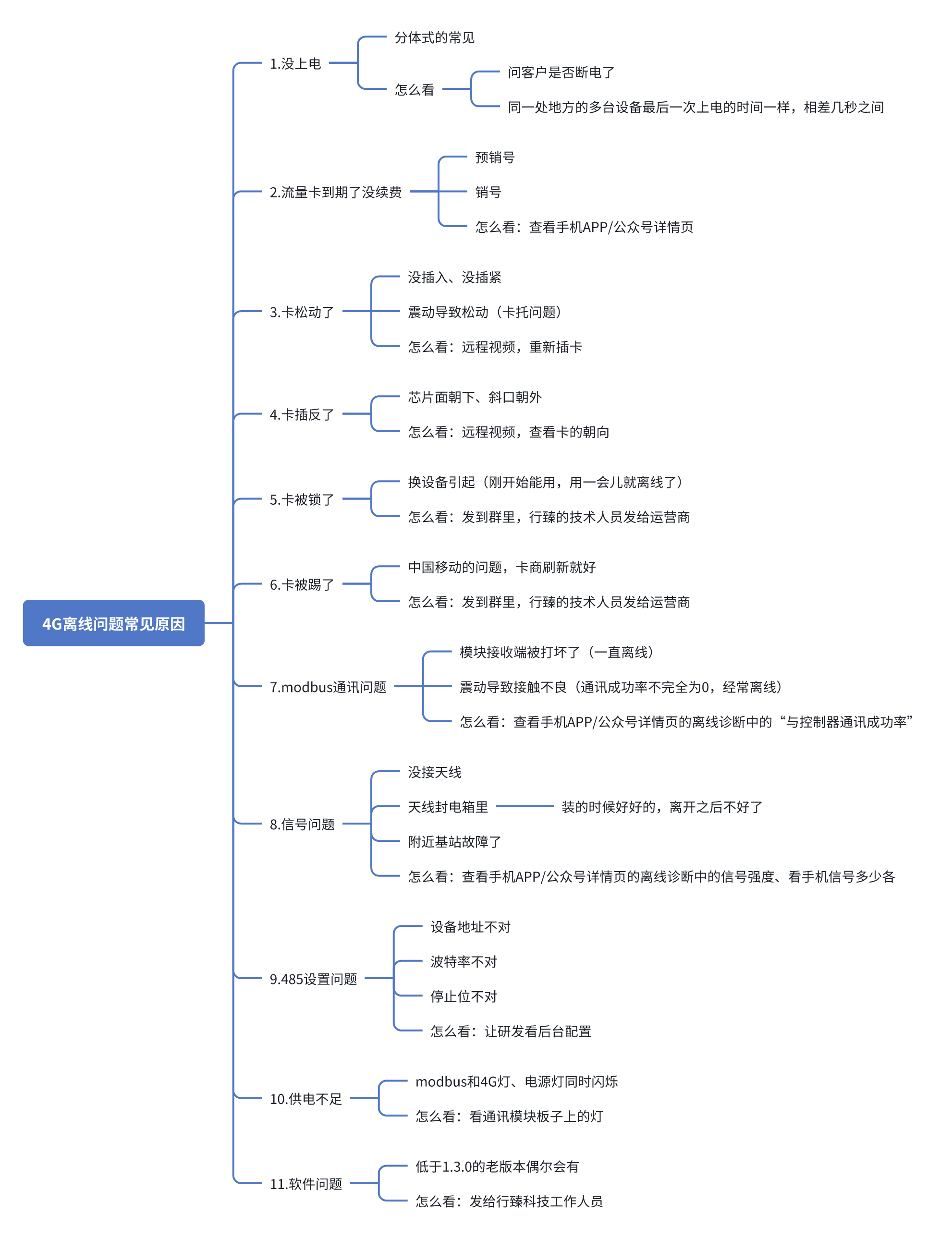
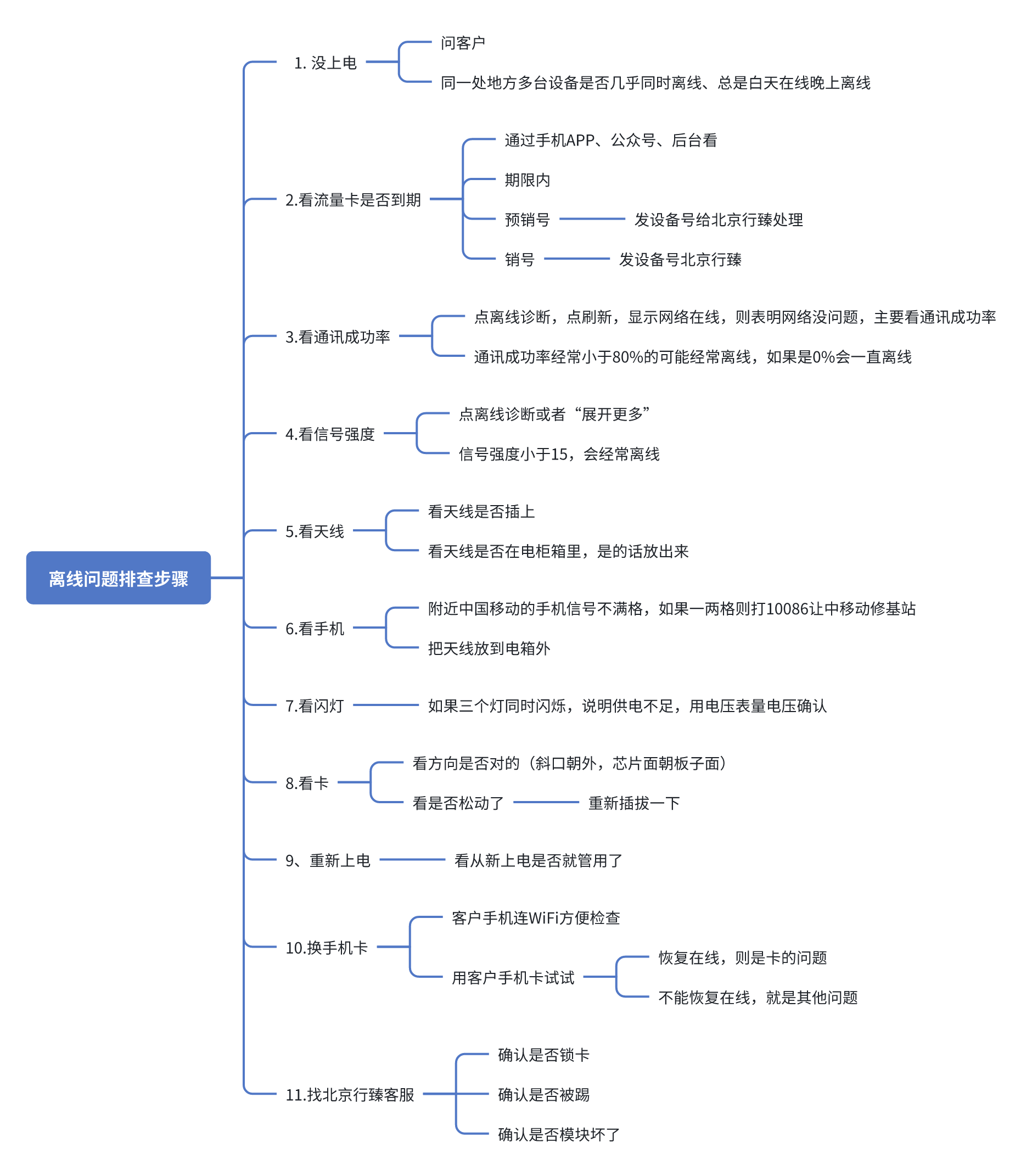
The main issue with 4G is offline. This article will detail several common causes of 4G offline issues, troubleshooting methods, and troubleshooting steps. First, let's look at the system architecture:
2. Common Causes of 4G Offline
3. Offline Troubleshooting Steps
4. How to Read the Offline Diagnosis Page
4.1 Signal Strength
| Signal Strength | RSSI Range (dBm) | Signal Level | Description |
|---|---|---|---|
| 31 | >-51 | Extremely strong | High-speed transmission |
| 26-31 | -52~-71 | Strong | HD video |
| 20-25 | -72~-81 | Medium | Sensors, normal voice |
| 14~19 | -82~-91 | Weak | Low-speed heartbeat packets, 10% packet loss rate |
| 10-13 | -92~-97 | Extremely weak | Unstable connection, frequent disconnection |
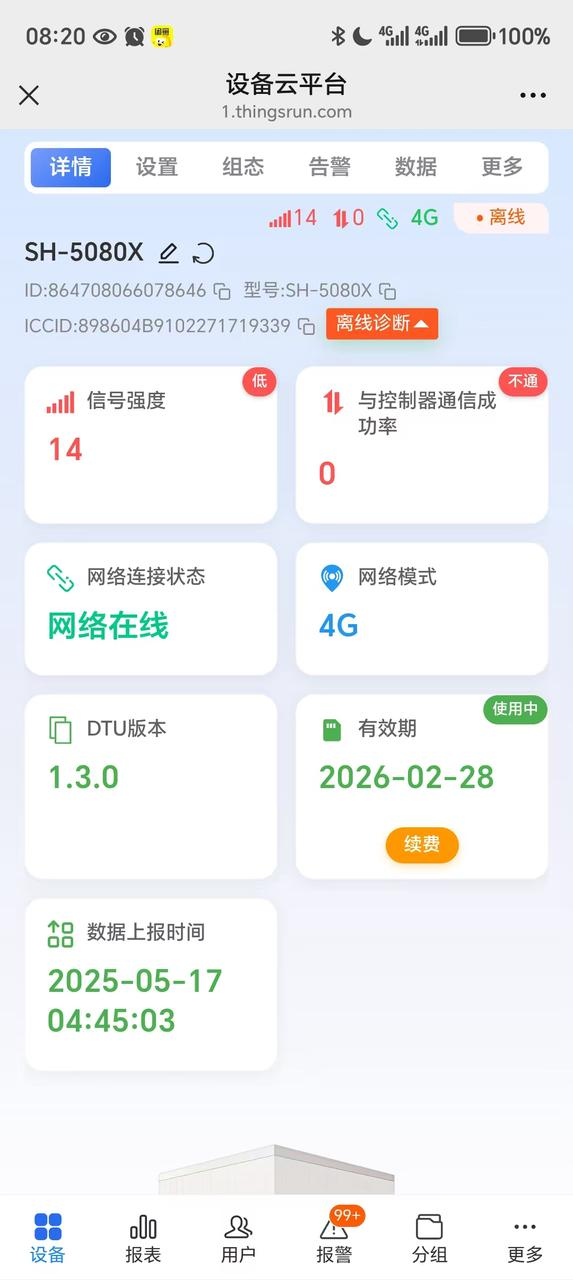
Try to ensure the signal strength is above 20. Below 20, especially below 15, it is easy to disconnect.
When the signal is weak:
- The nearby base station signal is not good, you can check through the mobile phone, if the China Mobile card mobile phone has only one or two bars, it proves that the nearby signal is weak.
- The antenna is hidden in the electrical box It's like the phone enters the elevator and can't make calls. Try to take it out and put it outside.
4.2 Communication Success Rate with Controller
- 0: Indicates that the communication module sends data to the controller but receives no response. Communication is broken, which will inevitably lead to offline.
- 1~90: Communication between the communication module and the controller is not smooth, which will cause occasional offline, most likely due to poor contact.
- 91~100: Communication between the communication module and the controller is normal.
4.3 Network Connection Status
- Network online: 4G network communication is normal
- Network offline: 4G is disconnected
4.4 Network Mode
4G/WIFI
4.5 DTU Version
The current latest version is 1.3.0, which is the most stable version.
4.6 Validity Period
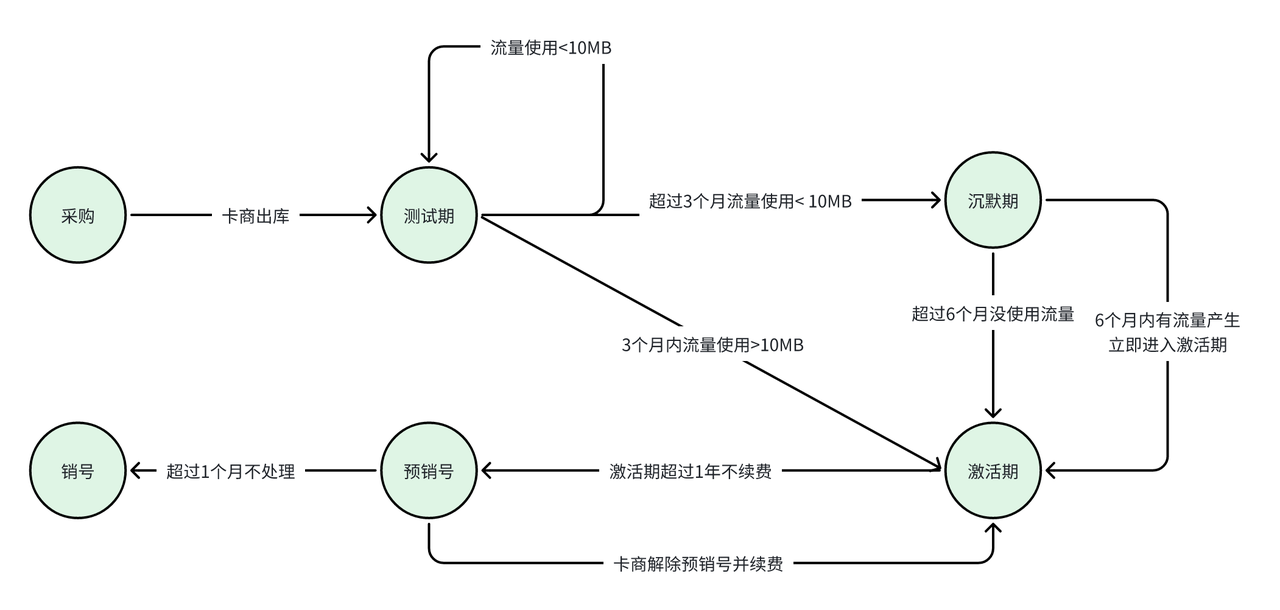
Display the expiration time of the data card, and there is a card status in the upper right corner.
- Test period/Silent period: Not yet activated, as long as the network is online, no need to worry, after the data usage exceeds 10M, it will automatically switch to activation period (in use)
- In use: Not expired, normal use
- Pre-cancellation: Expired, but can be manually restored
- Cancellation: Expired, cannot be restored, only send the card.
4.7 Data Reporting Time
The last time the server received data reporting from the 4G module.
4.8 Connection Status
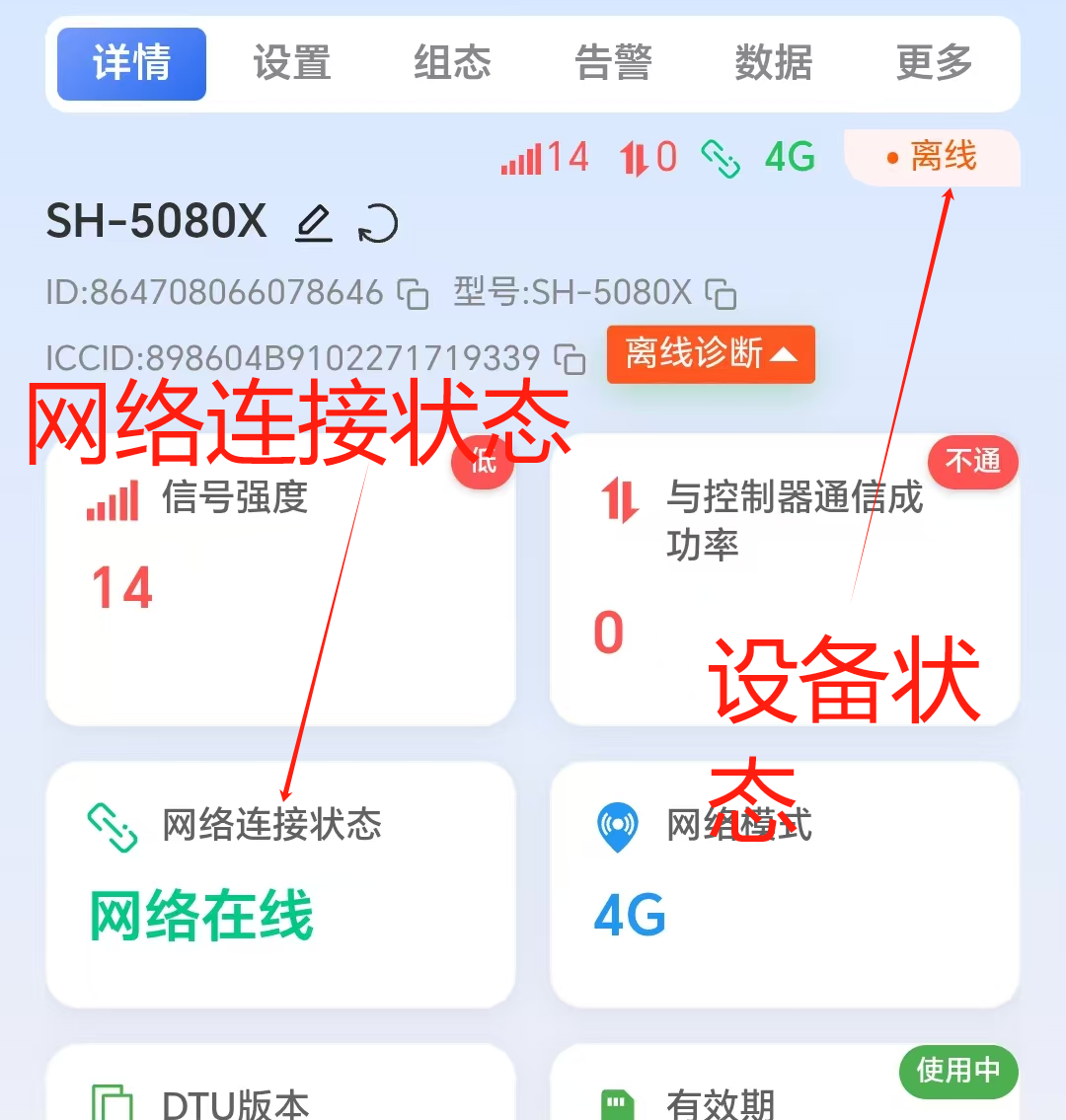
- Device status: Displays the communication status between the communication module and the controller: offline, online
- Offline: The server has not received data reported by the 4G module (data reported by the controller) for more than 10 minutes. The main reason is that the communication between the 4G module and the controller is broken, and data cannot be collected.
- Online: The server has received data reported by the 4G module within 10 minutes, and the 4G module can collect data from the controller.
- Network connection status:
- Network offline: The server has not received network communication data from the 4G module for more than 20 minutes. Network is not connected
- Network online: The server has not received network communication data from the 4G module within 20 minutes. Network is connected
5. Can the data card be used across provinces? Which provinces cannot be used?
Yes, 100MB data cards can be used across provinces without restrictions, and will not lock the card. Currently, most areas in China can use it, including Tibet, Xinjiang, Yunnan, etc., without restrictions. Cards above 300MB will have restrictions.
6. Can the data card be used on different devices?
No. Unused new cards can be used on any 4G device, but once a card has been used on one device and has generated traffic, it cannot be used on any other device. If accidentally used on another device, after normal use for a few minutes or hours (depending on how long it takes the operator to detect it), the card will be locked and the SIM card will become permanently unusable. The device will need to contact customer service for a replacement card to function again. This is a mandatory policy by China Mobile.